Essay Agent Setup
Coding Agent Setup on Monorepo Structures With Nx or Turborepo
Configure Nx and Turborepo differently to keep agents focused on relevant code.
Coding agents fail in monorepos for a reason that has nothing to do with model quality. A monorepo is simultaneously the best environment for an agent reasoning about cross-cutting changes and the worst environment for an agent that cannot distinguish relevant context from noise. What separates working setups from frustrating ones is deliberate configuration, and the steps differ meaningfully between Nx and Turborepo.
Why monorepos create a context problem for coding agents
The structural advantage of a monorepo is immediate and concrete. Shared types, APIs, UI components, and services live under one Git root, so an agent can find both sides of an API contract without a developer manually ferrying definitions across repositories. An agent asked to add a field to an API response can locate the Zod schema in packages/api, the TypeScript type in packages/shared, and the rendering component in apps/web. In a multi-repo setup, that same agent would hallucinate the frontend type because it cannot see the backend. The monorepo removes the visibility barrier that causes the most common class of cross-repository agent errors. A single PR can touch the API, the shared library, and two frontend apps, and the agent receives immediate TypeScript feedback when a contract breaks rather than discovering it in a different CI pipeline hours later.
The scale counter-problem arrives on the other side of that same advantage. A large monorepo can exceed even a generous context window when the agent tries to explore the full repository before writing a single line. An agent modifying a payments service has no reason to read the marketing site, the analytics pipeline, or infrastructure configurations, but without explicit scoping it will. The failure mode here is silent and costly: the agent produces clean, type-safe, well-commented code that calls a method signature renamed three months ago in a shared library three directories up. Tests pass because the mock still uses the old signature. The bug surfaces in staging, far from where the agent's work was reviewed. The problem is not that the agent lacks capability. It is that the agent's attention was spread across fifty packages when it needed to focus on five, and the one file that would have caught the error never made it into context.
How Nx and Turborepo differ in what they expose to an agent
Nx and Turborepo take fundamentally different approaches to workspace metadata, and those differences determine what an agent can know without reading source files. Nx exposes a queryable project graph: structured metadata about every application, library, dependency relationship, tag, and target configuration. Agents interrogate this graph with CLI commands rather than grepping through files. Nx's AI integration documentation describes agents using commands like nx show projects and nx graph to understand workspace structure, filter projects by type or tag, trace dependencies, and identify affected projects. Nx says this architectural awareness is critical for agents in large monorepos, because understanding project relationships determines the quality of generated code. An agent that can query which packages depend on the one it is about to modify starts from a map rather than an expedition.
Turborepo operates as a task runner. It provides a turbo.json task graph, content-aware caching, and workspace filtering. It does expose a queryable project graph, via turbo query, a GraphQL interface stable since v2.9, and built-in code generation via turbo gen, available since v1.10. But these capabilities sit inside a deliberately narrower scope. Turborepo's design priority is fast task execution, not workspace management. The ^ prefix in dependsOn: ["^build"] means "build my dependencies first". Without ^ it means "run another task in the same package first". Agents and humans alike mix these up, and the agent has no automatic way to learn the distinction unless it is taught. The implication for setup is direct. Nx has more to configure because it offers more. Turborepo setup is narrower but still requires deliberate scoping work, because the metadata an Nx agent can query must be written down for a Turborepo agent to find.
The instruction-file system both toolchains rely on
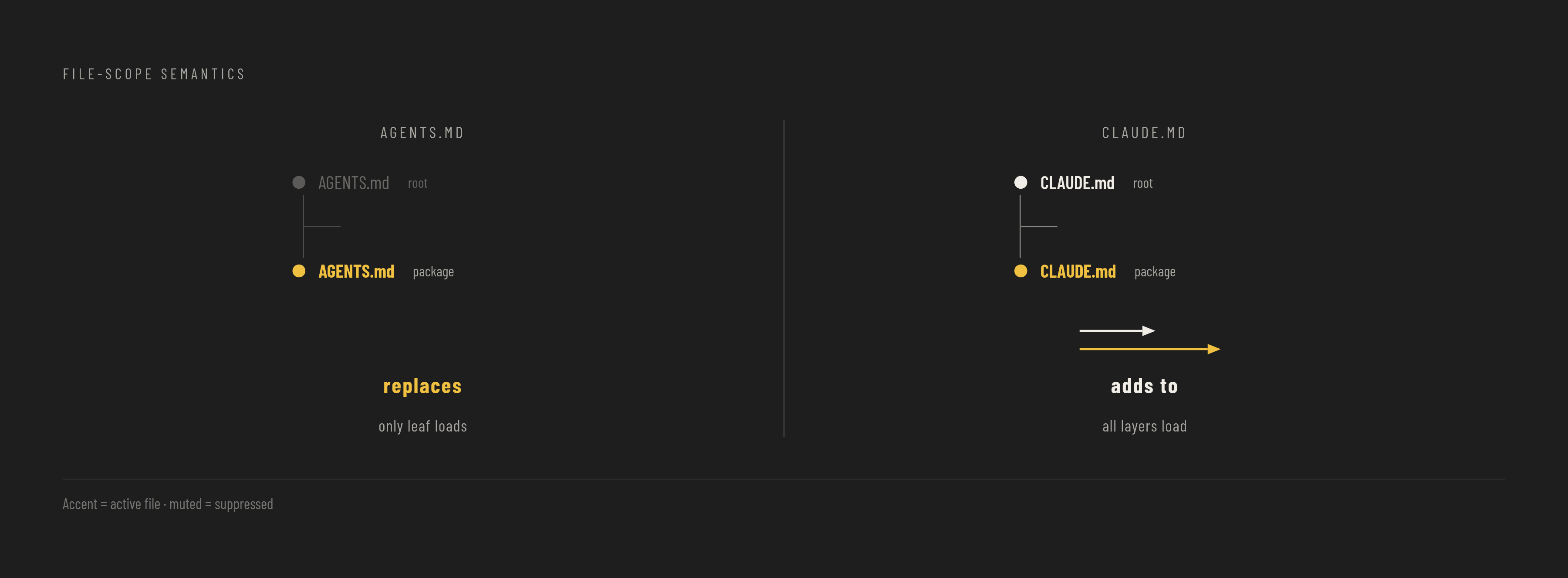
Both Nx and Turborepo agent setups are built on a tiered, file-based instruction system, and understanding how resolution works is prerequisite to writing files that actually load. Agents read the nearest AGENTS.md in the directory tree. The closest file takes precedence, so a package-level file overrides the root for an agent working in that package. Claude Code's CLAUDE.md behaves differently: every file from the root down to the working directory is concatenated, not overridden. The two formats have opposite resolution semantics. A nested AGENTS.md replaces the parent context. A nested CLAUDE.md adds to it. The practical layout that works across formats is a root AGENTS.md carrying project-wide conventions, per-package AGENTS.md files carrying local patterns, and CLAUDE.md stubs pointing to the AGENTS.md files for cross-agent compatibility. One set of instructions then serves all major agents: Claude, Codex, Copilot, Cursor, Gemini, and opencode.
The scope failure mode to avoid is making every rule global. If all rules load on every request, the agent pulls dozens of task-irrelevant rules into its context and the window becomes inefficient. Only rules that concern the entire project belong at the root. Everything else should be scoped to the module or package where it applies. The scale evidence for this practice comes from OpenAI's main repository, which carries 88 AGENTS.md files, one per package at that scale. The discipline scales.
The scale counter-problem arrives on the other side of that same advantage.
Configuring an agent to work in an Nx monorepo
Nx provides a single command that wires together agent configuration files, workspace-aware skills, and a CI integration channel. The entry point is npx nx configure-ai-agents. The command writes AGENTS.md and CLAUDE.md with workspace-specific guidelines, agent skills, and the Nx MCP server configuration for workspace exploration, code generation, task execution, CI monitoring, and package linking. Supported agent targets are Claude, Codex, Copilot, Cursor, Gemini, and opencode, and all configurations are generated from a single source of truth so every tool gets the same capabilities. For Claude Code, skills are installed via a plugin. For other agents, they are copied into the workspace. Verify the output with npx nx configure-ai-agents --check=all before committing. Teams that want skills only, without the MCP server or Claude plugin, can run npx skills add nrwl/nx-ai-agents-config.
The skills system matters because it replaces a bloated system prompt with incremental loading. Nx's agent skills documentation explains that skills are structured knowledge loaded only when the agent actually needs them, rather than dumped into context upfront. The Nx MCP server was previously the delivery mechanism for all capabilities. It is now lean and focused on remote service connections: Nx Cloud CI pipelines, self-healing fixes, running processes, and Nx documentation. Everything else moved to skills. The key skills shipped with configure-ai-agents each solve a specific problem. nx-workspace teaches the agent to explore monorepo structure using the project graph via nx show projects and nx graph, filter by type, tags, and patterns, find affected projects, trace dependencies, and understand target configurations. nx-generate teaches the agent to find the right generator, read its schema, run it with flags that match existing workspace conventions for naming, tags, and directory structure, then verify the output passes lint, test, and build. The combination of generator predictability with agent intelligence is the point: the agent stays on the workspace's rails rather than inventing its own structure. nx-run-tasks teaches proper use of nx run, nx run-many, and nx affected, including flags like --configuration, --parallel, and project pattern filtering. monitor-ci opens a communication channel between the local agent and Nx Cloud. The agent pushes a PR, monitors CI status in real time, receives failure context from Nx Cloud and Self-Healing CI, applies verified fixes, and repeats until CI is green.
Per-package AGENTS.md files complete the scoping strategy. The root AGENTS.md covers global conventions: tech stack, build commands, workspace-wide rules. Each package carries its own AGENTS.md scoped to that package's patterns, such as backend validation rules, frontend component library constraints, or shared type versioning rules. An agent working in packages/api loads only API-relevant instructions. The Self-Healing CI loop closes the operational gap. Nx's enhance-AI documentation describes the workflow: agent commits, creates a PR, monitors CI, receives failure context from Nx Cloud, accepts the proposed fix or pulls context locally and applies it manually, repeats until CI is green. The developer reviews the final PR rather than intervening at each failure. The 2026 roadmap adds automatic context flow: when a CI failure occurs, context flows back to the local agent without the developer context-switching to diagnose it.
Configuring an agent to work in a Turborepo monorepo
Turborepo's narrower scope means agent setup is more manual. There is no single configuration command. The work breaks into three parts: teaching the agent the task graph semantics, scoping context with turbo prune, and writing per-package AGENTS.md files that carry what the project graph would otherwise supply. turbo prune is the primary scoping mechanism. Running turbo prune apps/web generates a sparse copy of the monorepo containing only the target package and its dependencies, with a pruned lockfile. The command is especially useful for Docker builds, and it works equally well for scoping agent sessions. Hand the pruned output to the agent and it starts with exactly the context it needs for that package, not the full repository. This is the Turborepo equivalent of the project graph's affected-project filtering. It is manual rather than queryable, but effective for targeted work.
Teaching the agent turbo.json task graph semantics must happen in writing, because the agent cannot infer them. The ^ prefix in dependsOn: ["^build"] means "build this package's dependencies first". Without ^ it means "run another task in the same package first". This must be explained in the root AGENTS.md because agents will otherwise misread the graph. Composable Configuration, introduced in Turborepo 2.7 in December 2025, improves how agent-facing task metadata is expressed and shared across packages. Per-package task descriptions that document what a task does and what it expects become a structured knowledge source agents can read. The root AGENTS.md should cover the tech stack, workspace structure overview, build commands, the ^ dependency prefix explained, and which packages exist and what each does at a high level. Each per-package AGENTS.md carries the patterns specific to that package: backend validation rules, frontend state management conventions, shared-type versioning rules. A CLAUDE.md stub at root and per package pointing to AGENTS.md provides cross-agent compatibility. For task execution, workspace filtering serves as an alternative to pruning: turbo run build --filter=apps/web... runs the task only for the target package and its dependencies. The agent should be taught to use filtering rather than running tasks across the full workspace when working on a scoped change.
What Turborepo does not provide is a tradeoff, not a failing. There is no queryable project graph: the agent cannot run a command to discover all packages, their types, or their dependency relationships. This information must be written into AGENTS.md explicitly, or the agent will scan files to reconstruct it. There is no built-in code generation: the agent generates code directly from its training rather than invoking a scaffolding system. Compensate by including explicit examples of naming conventions, directory structures, and file templates in per-package AGENTS.md files. There is no native CI integration channel: the agent cannot monitor a remote CI pipeline or receive failure context automatically. The developer must manually paste failure output or use a separate CI tool. These gaps match Turborepo's deliberate focus. A team that wants a fast task runner without the overhead of a broader workspace management system accepts the manual scoping work in exchange for that simplicity.
What the two setups share and where to spend additional effort
After initial setup, the remaining agent failures in both toolchains share a common root: insufficient boundary information, not insufficient tooling. The AGENTS.md plus stub-CLAUDE.md pattern is the compatibility layer that lets one set of instructions work across all major agents. Per-package scoping is the highest-leverage ongoing practice. As the monorepo grows, add per-package AGENTS.md files that describe each package's purpose, patterns, and boundaries, so context does not bleed across packages. Both toolchains benefit from explicitly documenting the workspace structure in the root AGENTS.md: which packages exist, what each does, which are public APIs versus internal utilities. Without this map, an agent explores by reading files rather than by consulting structured metadata, and that exploration is exactly where context burns away.
The stale-signature failure mode persists even with correct setup. An agent asked to update an authentication service's token refresh endpoint produces clean, well-commented, type-safe code that calls a method signature renamed three months ago in a shared library three directories up. The tests pass because the mock still uses the old signature. The bug surfaces in staging when the real library is pulled in. This is not a toolchain configuration problem. It is a freshness problem: the agent's knowledge of the shared library is local to the files it has read in the current session. The mitigation is to flag recently changed shared interfaces in AGENTS.md entries, or to adopt a convention of running the project graph's affected analysis before accepting a cross-package change. Teams that read this far and realize they cannot restructure their repositories still have a path. A synthetic monorepo brings project graph capabilities and agent skills to a polyrepo setup without moving any code. The strongest objection to monorepo tooling, that structure matters more than colocation, is answered directly: teams with existing multi-repo structures get monorepo-style agent benefits without a migration. The setup work described throughout this article then becomes available regardless of where the repositories physically live.