
Essay Agent Setup
Connecting GitHub Copilot to Slack for PR Reviews
Separate GitHub and Slack configurations let teams automate code review from conversation.
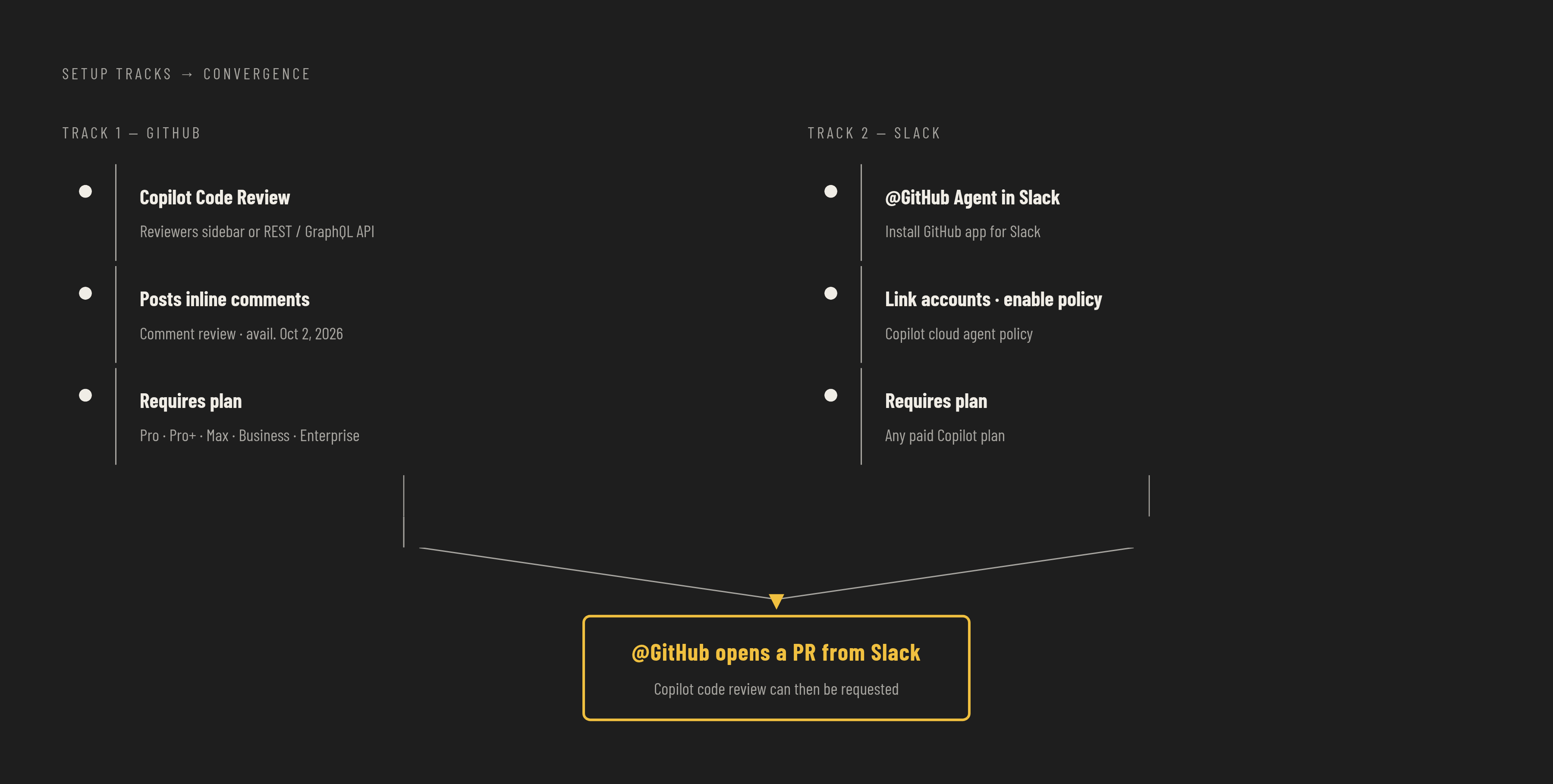
A team that sets out to "connect Copilot to Slack" usually assumes there's one switch to flip. There are two, and they live on different sides of the product. Connecting GitHub Copilot to Slack for PR reviews requires configuring Copilot's native code review on pull requests, which is a GitHub-side feature, and separately configuring the @GitHub agent inside Slack, which is a Slack-side integration. Each layer has its own prerequisites, its own permission rules, and its own billing mechanics, and turning one on does not turn the other on.
The overlap in naming is what causes the confusion. Both features say "GitHub" and "Slack," and both eventually touch a pull request, but they sit on opposite ends of the workflow. Copilot code review acts as a reviewer added directly to a PR inside GitHub: it reads the diff and leaves inline comments with suggested fixes, the way a colleague would. The @GitHub agent in Slack does something upstream of that: it lets a team start a Copilot coding session from a Slack channel, thread, or DM, investigate a problem, implement changes inside a cloud sandbox, and open a pull request, all without anyone opening the GitHub UI first. The two meet at exactly one point. Once @GitHub opens a pull request from a Slack conversation, the native Copilot code review feature can then be requested on that PR, which is what completes the loop from conversation to code to review.
What Copilot code review does on a pull request
Copilot code review is a reviewer, not a tool that offers passive suggestions. Once added to a pull request, it reads the full diff, pulls in broader context from the surrounding repository, and posts inline comments with suggested fixes, following the same review conventions a human teammate would use. That distinction matters for how teams should think about assigning it: it occupies a reviewer slot, with its own identity in the Reviewers sidebar, functioning as an assigned reviewer.
The underlying architecture changed substantially in 2026. On March 5, 2026, Copilot code review went generally available on an agentic architecture for Copilot Pro, Pro+, Business, and Enterprise plans, replacing an earlier single-pass model that reviewed a diff in isolation. The agentic version pulls in repository context beyond the changed lines, so its feedback can point to patterns and conventions elsewhere in the codebase, not just judge a diff on its own. A review under this architecture finishes quickly and shows up in the pull request just as a standard review would, with comments attached to specific lines.
On October 2, 2026, GitHub released a REST and GraphQL API for requesting these reviews programmatically. That means review requests no longer have to be triggered by hand from the PR interface. They can be embedded directly into CI/CD pipelines and internal developer tools, so that a review can fire automatically the moment a PR opens against a protected branch, for instance.
Two constraints are worth understanding before configuring any of this. First, Copilot submits its findings as a "Comment" review. By default, it does not approve a pull request, and its review does not count toward the approvals a branch protection rule might demand. Administrators can turn on Copilot approvals, a feature currently in public preview and off by default, which lets Copilot's review count toward that required-approvals rule. Teams relying on Copilot as a gate rather than an advisory voice need to enable that setting explicitly. Second, re-review is not automatic. When a developer addresses Copilot's comments and pushes new commits, the review does not refresh on its own. Someone has to click "Re-request review" next to Copilot's name in the Reviewers sidebar, unless the repository's automatic review ruleset has the "Review new pushes" option enabled.
One more change affects how useful this layer can be. The 4,000-character cap on custom review instructions was removed in June 2026, and Copilot now honors AGENTS.md. That means a team can shape what Copilot flags, what it ignores, and how it frames its feedback, in far more detail than the earlier character limit allowed.
What the @GitHub agent in Slack does
GitHub launched the new Copilot experience in Slack on August 21, 2026, as a public preview, and organizations on Copilot Business and Enterprise plans can use it. Public preview means the feature works and you can use it for real work, but GitHub still treats it as subject to change, so any team planning to depend on it for regulated or production-critical workflows needs to weigh that.
Mentioning @GitHub in a Slack channel, thread, or DM starts a shared agent session, visible to everyone present in that conversation. From there, the agent can answer questions about code and GitHub activity, triage bug reports, update or create issues, investigate failures, implement changes inside a secure cloud sandbox, and open a pull request that links back to the Slack conversation that started it. The session runs asynchronously, continuing to work while the team moves on to a meeting or other tasks, and anyone in the thread can redirect it mid-run.
GitHub is also a launch partner for Slack Code, a new channel type built just for agent work. When a task warrants it, Copilot can spin up a dedicated Slack Code channel, which keeps diffs, plans, and output previews, such as rendered HTML artifacts, out of the original conversation. Anyone from the originating thread can join that channel, add context, redirect the agent's approach, or stop the session. GitHub states that an archived Slack Code channel remains viewable and searchable afterward. That history becomes part of the data footprint a team has to account for when it thinks about retention and access.
A March 30, 2026 update extended the agent's reach into issue creation. Describing a piece of work in plain language in Slack now causes @GitHub to generate a structured issue, complete with title, body, assignees, labels, and milestones, and to split larger requests into parent and child issues from a single message.
Prerequisites and account configuration before any setup step will work
Both integrations share a baseline requirement at the GitHub organization level, but each layer adds its own conditions that you need to confirm before you touch Slack. For Copilot code review, the account in question has to be on Copilot Pro, Pro+, Max, Business, or Enterprise, with a Copilot Student option available for verified students. As of June 1, 2026, usage-based billing applies to all users, and code review consumes both GitHub AI Credits and GitHub Actions minutes, so a team enabling this at scale needs to confirm its budget allocation ahead of time. Reviews on private repositories draw on AI Credits plus Actions minutes, but reviews on public repositories are free. The organization is billed directly for usage from non-licensed users as GitHub AI Credits, so review coverage can extend to every pull request without a full Copilot seat for every contributor touching the repository.
The @GitHub agent in Slack has fewer conditions, but they are just as strict. The organization needs to be on any paid Copilot plan, meaning Copilot Pro, Pro+, Business, or Enterprise all qualify. An administrator has to have enabled the Copilot cloud agent policy for the organization, and without that step, mentioning @GitHub in Slack will not start an agent session at all, regardless of what plan individual users are on. Usage under this layer counts against the organization's existing Copilot entitlements and runs on the same Copilot cloud agent budgets already in place, so it does not add a separate cost structure. If a team confirms both of these account-level conditions before it starts setup, it will not hit a wall halfway through configuration with no clear sign of which layer caused the failure.
Copilot code review is a reviewer, not a tool that offers passive suggestions.
Setting up Copilot code review on pull requests: assigning the reviewer, writing review instructions, and triggering via API
Copilot can be added to any individual pull request the same way a human reviewer is added, through the Reviewers sidebar, but a one-off assignment leaves most of the feature's value untapped. Teams get more out of this layer by configuring it at the repository level and wiring it into automation rather than relying on someone remembering to add it manually each time.
The manual path starts simply: open a pull request, select Copilot from the Reviewers sidebar, and the review completes promptly, posting inline comments against the diff. If a developer pushes new commits after addressing those comments, the review does not refresh on its own. Re-review has to be requested explicitly by clicking "Re-request review" next to Copilot's name in that same sidebar, unless the repository has the "Review new pushes" option turned on in its automatic review ruleset.
The more consequential setup step involves AGENTS.md and custom review instructions. With the 4,000-character cap removed in June 2026 and AGENTS.md now honored, a team can give Copilot detailed guidance on what to flag, what to leave alone, and how to phrase its feedback for the conventions of that specific codebase. This is the lever that separates a default setup from one tuned for an actual engineering team. Without custom instructions, Copilot applies generic review heuristics that may not reflect the priorities of a given codebase, surfacing noise alongside anything genuinely useful. Investing the time to write those instructions is what turns the feature from a generic pass over a diff into something closer to a reviewer familiar with the repository's own standards.
The API path, available since October 2, 2026, lets a team embed review requests directly into CI/CD pipelines using the REST and GraphQL APIs, so a Copilot review can fire automatically the moment a pull request opens against a protected branch, without anyone clicking a button in the PR interface. Teams adopting this path should account for a billing shift that arrived alongside it: the default review effort level changed from Lite to Balanced, effective September 28, 2026. Every automated review under the new default is more thorough, and correspondingly more expensive in AI Credits and Actions minutes, than it would have been under the old default. And whichever trigger path a team chooses, the constraint from the previous section still applies when configuring branch protection: Copilot's review posts as a Comment and does not count toward required approvals unless an administrator has separately enabled Copilot approvals.
Setting up the @GitHub agent in Slack: installing the app, linking accounts, and starting the first agent session
Getting the @GitHub agent running in Slack follows a three-step sequence: install or upgrade the GitHub app for Slack, link each user's individual GitHub account, and confirm the Copilot cloud agent policy is enabled at the organization level if that step hasn't already happened during the prerequisites phase.
Installation comes first, and it matters that the app is current rather than a holdover from an earlier integration. The Copilot agent capabilities need the current version of the GitHub app for Slack, so if a workspace runs an older installation, it needs to upgrade before any of this will work. From there, each person who plans to interact with @GitHub has to link their own GitHub account through the app. That link is what ties a Slack identity to a specific set of GitHub permissions, a detail that becomes important in the next section. Finally, an administrator needs to confirm that the Copilot cloud agent policy is enabled for the organization; that policy is the gate that allows any agent session to start from Slack.
Once those three steps are done, you can start a session just by mentioning @GitHub in a channel, thread, or DM with a plain-language description of the task. The agent treats the entire thread as context, not just the single message containing the mention. Prior conversation in that thread shapes what the agent understands about the request. That's a deliberate design choice, and it carries a real operating implication: for any task touching sensitive or unrelated context, starting a fresh thread or moving to a direct message limits what the agent can see. GitHub's own guidance says to use a DM when you need to keep context contained, rather than rely on a busy shared channel that pulls in the full history regardless of relevance.
When a task is substantial enough, the agent can spin up a dedicated Slack Code channel, where the team can inspect its plan, review diffs, and iterate without cluttering the original conversation. A smaller but useful configuration detail: running @GitHub's settings inside a channel sets a default repository for new Copilot threads started there, which removes the need to specify the repository by name in every single prompt. Once a session is running and producing results, the question most teams ask next is who, exactly, is allowed to do what inside it.
Permission model across DMs, shared channels, and Slack Code channels
Membership in a Slack channel is not what determines what the @GitHub agent is allowed to do. Repository permissions and the organization's Copilot cloud-agent policy govern that, and they apply differently depending on whether a session starts in a direct message or in a shared channel.
In a direct message, Copilot acts using the linked individual's own GitHub permissions, so the agent's access is bounded by whatever that specific person is authorized to do in the repository. In a shared channel or group thread, the behavior changes: the agent creates issues and pull requests under the Copilot app's own identity, rather than attributing that work to whoever typed the mention. So if a developer works in a busy shared channel, the session can produce GitHub artifacts attributed to the app itself, not to them personally, and that distinction matters for audit trails and for anyone later tracing who requested a given change.
Whether a person can trigger the agent to make actual changes to code depends on write access to the target repository. Other participants in the same conversation can still add context the agent will use, even if they don't hold write access to that repository themselves. GitHub states that workspace guests and outside repository collaborators cannot start or steer a Slack or Teams session at all, which closes off one obvious risk. It does not close off a subtler one: a participant without write access can paste outdated or sensitive information into a thread, while a teammate who does have write access requests the implementation, and the agent will use both inputs without distinguishing where the authority to act actually came from. Any team adopting this integration at scale needs governance around what gets pasted into these threads, not just around who is allowed to press go.
Notes
- The new GitHub Copilot experience in Slack - GitHub Changelog
Provided details on the August 21, 2026 public preview launch, Slack Code channels, and the GitHub app installation requirement for the @GitHub agent.
- Create issues from Slack with Copilot - GitHub Changelog
Provided details on the March 30, 2026 update enabling structured issue creation from plain-language Slack messages.
- GitHub Copilot code review will start consuming GitHub Actions minutes on June 1, 2026 - GitHub Changelog
Provided the June 1, 2026 billing change details showing code review consumes both GitHub AI Credits and GitHub Actions minutes.
- Integrating Copilot cloud agent with Slack - GitHub Docs
Provided the step-by-step setup requirements for integrating the Copilot cloud agent with Slack, including the policy enablement prerequisite.
- Copilot code review: AGENTS.md support and UI improvements - GitHub Changelog
Provided the June 2026 details on AGENTS.md support and removal of the 4,000-character cap on custom review instructions.
- Copilot code review: API support and new default effort level - GitHub Changelog
Provided details on the October 2, 2026 REST and GraphQL API release for requesting reviews programmatically and the effort level change.
- Copilot code review now runs on an agentic architecture - GitHub Changelog
Provided details on the March 5, 2026 general availability of Copilot code review on an agentic architecture across paid plans.
- Using GitHub Copilot code review - GitHub Docs
Provided details on Copilot approvals being a public preview feature that must be explicitly enabled to count toward branch protection rules.